Troubleshooting
Troubleshooting plugin entry, membership, sending, and backend connection
Diagnose common WslinkDesk problems by symptom, including missing UI, activation failures, scheduled tasks, imports, and offline state.
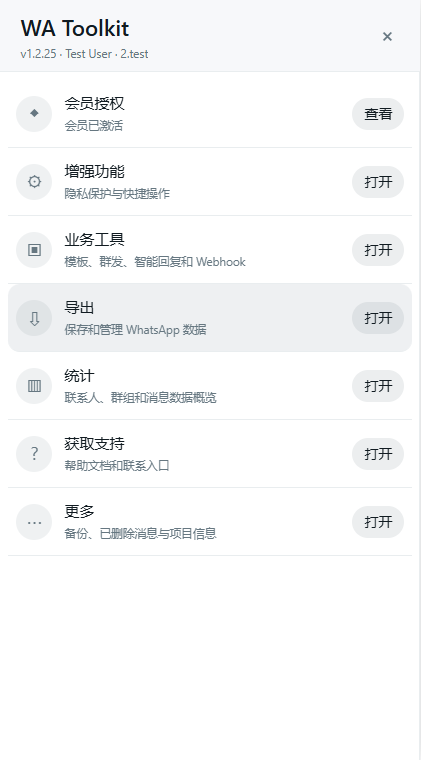
Figure 1: In a healthy state, the plugin home shows its version, active account, and available tools.
1. The plugin entry is missing
Confirm that WA Toolkit is enabled on the extension management page, the browser version is 120+, the current URL is https://web.whatsapp.com, and the WhatsApp chat list has loaded.
Refresh WhatsApp Web and try the toolbar extension icon. If the entry is still absent, check the extension management page for load errors and select the extracted directory that directly contains manifest.json.
2. Membership activation fails
Copy the complete key again without spaces or line breaks, confirm network access to the license service, and verify that the intended WhatsApp account is signed in. If the key is bound to another account or device, ask the administrator to review binding instead of repeatedly retrying.
Never publish a full membership key in a screenshot.
3. A template or campaign fails
Read the visible error first. Then confirm that WhatsApp Web remains signed in, manual sending works, each attachment is no larger than 16 MB, total template attachments are no larger than 32 MB, and target numbers are valid.
A target becomes sent only after WhatsApp confirms it. Do not resend the whole audience after a partial failure, because successful recipients could receive duplicates.
4. A scheduled activity does not run
Schedules use the browser’s local time zone. Check the computer clock and keep the browser, authenticated WhatsApp Web tab, and computer awake at execution time.
A normal browser plugin cannot call WhatsApp private APIs after the computer is off. Use an always-on environment or server-side Provider for 24×7 operation.
5. Backend connection is offline
Check membership, the complete API address, whether the company token exceeded its ten-minute lifetime, whether the account is disabled, and whether the WhatsApp page is available.
The connection retries with backoff after network recovery, so repeated refreshes are unnecessary. If Backend is online but Page is unavailable, reopen or restore the authenticated WhatsApp Web tab.
6. A backup cannot be imported
Import only JSON exported by WslinkDesk. Oversized files, invalid structures, or dangerous fields are rejected before current data changes.
Connection tokens, Webhook Authorization, and custom headers intentionally do not migrate in a normal backup. Reconfigure them securely after recovery.
7. What to send support
If the issue remains, use Online support on this site and provide the product path, browser and plugin version, page and action that failed, the complete visible error text, and whether the problem reproduces consistently.
Do not send membership keys, company connection tokens, Webhook secrets, customer messages, or other sensitive data. Support will describe a safe transfer method if additional evidence is required.